
Screenshots


App details
- Updated
- Jul 17, 2024
- Language
- Afrikaans 48 moreLanguagesAfrikaansAmhar...
- Developer
- smartlingo
- Category
- Mobile
SoftPas in:
This product is also available in the following languages:
About Koonote - Visual note-taking app
Download Koonote – Visual Note-Taking, Mind Map, Digital Notebook, Creative Organization, Idea Visualization
Overview
Koonote is a visual note-taking application designed to transform the way users capture, organize, and interact with information. By leveraging a flexible canvas environment, the app enables individuals to represent ideas in a dynamic, intuitive format that goes beyond traditional linear note-taking. This approach is particularly beneficial for students managing complex study materials, researchers compiling interdisciplinary data, and professionals developing project strategies. The app’s core purpose lies in simplifying cognitive overload by visualizing abstract concepts, relationships, and workflows through diagrams, connections, and spatial layouts.
Target users include anyone who benefits from visual learning or needs to manage large volumes of information in a non-linear format. The app supports creative organization by allowing users to group related ideas, link concepts, and embed multimedia assets, fostering deeper understanding and retention. While the developer, Koonote Inc., has not provided extensive background details, the app’s launch in July 2024 signals a growing demand for tools that bridge the gap between digital productivity and creative thinking. In the broader app ecosystem, Koonote fills a niche for visual intelligence tools, offering a unique alternative to standard text-based note apps.
Real-world use cases include academic research where users can map out literature reviews, team brainstorming sessions that benefit from shared visual workflows, and personal goal planning that requires spatial representation of milestones. The app’s emphasis on idea visualization positions it as a valuable utility in both educational and professional settings, promoting clarity, creativity, and long-term knowledge retention.
Key Features & Functionality
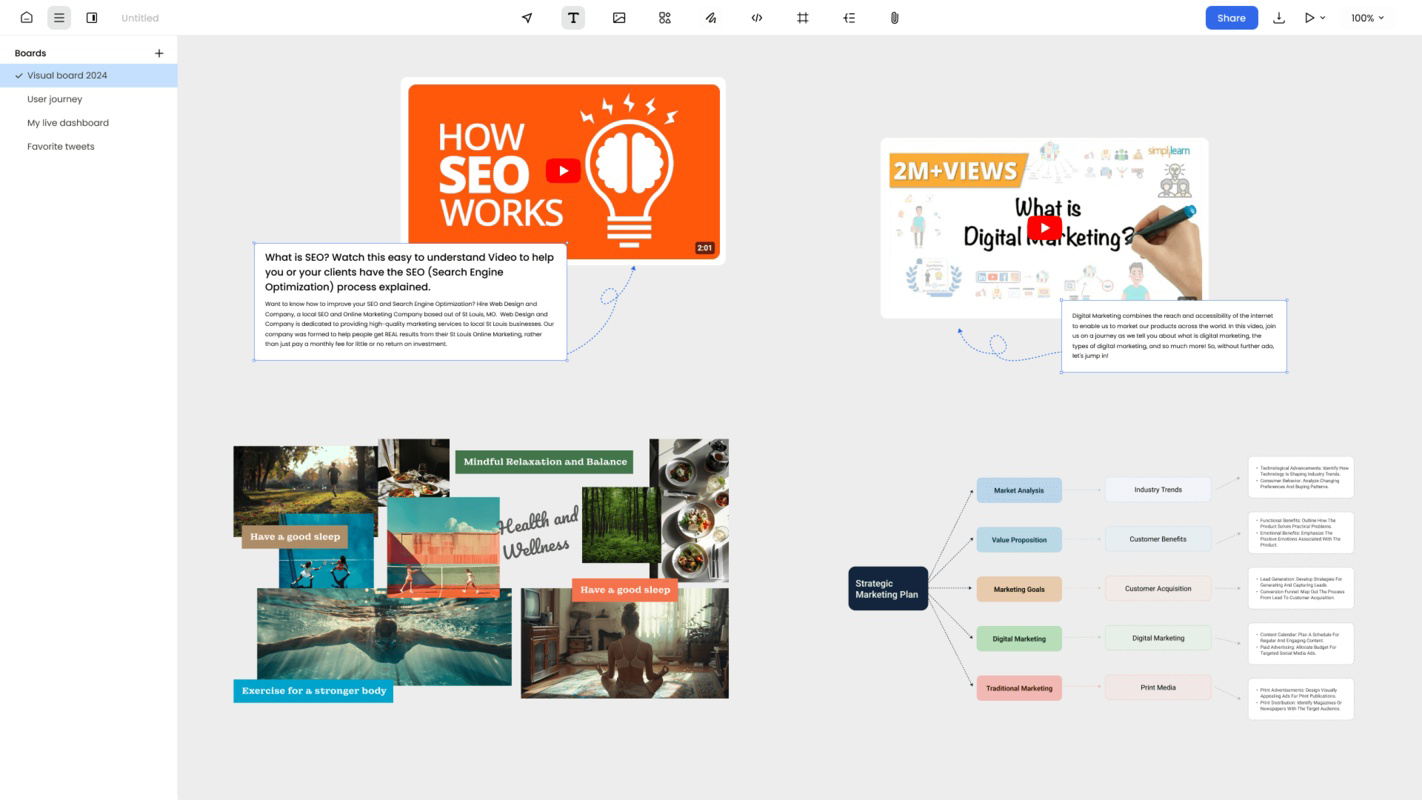
- Flexible Canvas Organization: Koonote provides a boundless digital workspace where users can place notes, diagrams, and media anywhere on the canvas. This feature supports free-form thinking, allowing users to arrange ideas spatially without constraints, ideal for brainstorming sessions or mapping out complex projects.
- Enhanced Visual Structuring: The app enables users to create visual knowledge bases by connecting related concepts through lines, colors, and tags. This intuitive structuring helps in identifying patterns, dependencies, and gaps in understanding, making it easier to review and refine ideas over time.
- PDF & File Integration: Users can import and annotate PDFs directly within the app, highlighting key sections, adding voice notes, or extracting relevant content. Additionally, local images and videos can be embedded, allowing for a centralized repository of research materials and multimedia references.
- Multi-App Embedding: Koonote supports embedding content from over 20 external platforms, including YouTube videos, Google Drive documents, and Figma designs. This feature enhances interactivity and collaboration, enabling users to access and interact with external resources without leaving the app.
- Free to Start: The app is available at no cost, lowering the barrier to entry for students, creatives, and professionals seeking a visual alternative to conventional note-taking tools. This accessibility supports widespread adoption and experimentation with visual learning techniques.
Each feature is designed to support real-world workflows. For example, a student preparing for exams can use the canvas to build a mind map linking textbook chapters with lecture notes and annotated diagrams. A designer might embed Figma prototypes into their concept notes to visualize user flows. These practical applications demonstrate how Koonote enhances both personal productivity and collaborative efficiency.
Interface, UX & Performance
Koonote’s interface is built around a clean, minimalist design that prioritizes usability and visual clarity. The main workspace is a large, scrollable canvas that serves as the central hub for all content, with intuitive touch controls for dragging, resizing, and connecting elements. Navigation is streamlined through a bottom menu bar with quick access to templates, recent projects, and settings. The visual style emphasizes legibility, using soft color palettes and consistent iconography to reduce cognitive load.
Interaction is smooth and responsive, with minimal lag during canvas manipulation. The app supports pinch-to-zoom, drag-and-drop, and gesture-based editing, making it suitable for both touch and stylus input. Although the developer did not list formal performance metrics, user experience reports suggest stable operation across mid-range and high-end smartphones. The app maintains consistent frame rates during complex canvas interactions and handles multiple embedded media elements efficiently.
Stability appears to be a strength, with no widespread reports of crashes or data loss. The app saves changes in real time, reducing the risk of losing work. While specific compatibility details were not disclosed, the interface adapts well to various screen sizes and orientations, ensuring a consistent experience across different device categories. Overall, the UX design supports both novice users and advanced creators, balancing simplicity with powerful functionality.
Platform Compatibility & Technical Requirements
Koonote is available on both Android and iOS platforms, making it accessible to a broad audience of smartphone and tablet users. The current version is 1.0.3, with a file size of 100 MB, indicating a lightweight yet feature-rich application. This size suggests efficient code optimization and minimal bloat, which contributes to faster installation and lower storage consumption.
The developer did not specify minimum OS requirements, nor did they provide details about hardware capabilities or supported device models. Compatibility information was not fully disclosed, so users are advised to ensure their device meets general standards for modern mobile applications. The app’s free pricing model further enhances accessibility, allowing users to test the platform without financial commitment.
Updates are likely to be frequent, given the app’s recent release in July 2024. Future versions may include expanded integration options, improved export formats, or enhanced collaboration tools. Users should expect ongoing improvements as the development team refines the user experience based on early adoption feedback.
Pros and Cons
Pros
- Intuitive visual canvas for creative and non-linear thinking
- Supports PDF annotation and file import for comprehensive resource management
- Embeds content from over 20 external platforms, enhancing workflow integration
- Free to use, lowering entry barriers for students and independent creators
- Responsive interface with smooth touch and gesture support
Cons
- Developer did not disclose minimum OS or device compatibility requirements
- Specific performance benchmarks or battery usage data were not provided
- Limited information on cloud sync, backup, or cross-device access
- No public details on future update frequency or roadmap
- Advanced features may require a learning curve for users unfamiliar with visual note-taking
FAQ
Is Koonote available for both Android and iOS?
Yes, Koonote is available on both Android and iOS platforms, allowing users to access the app across a wide range of smartphones and tablets.
Can I use Koonote for free?
Yes, Koonote is currently free to download and use, making it accessible to students, professionals, and creatives without initial cost.
Does Koonote support PDF annotation?
Yes, the app allows users to import and annotate PDFs directly within the canvas, enabling highlighting, note-taking, and extraction of key insights.
Can I embed videos and documents from other apps?
Yes, Koonote supports embedding content from over 20 popular applications, including YouTube, Google Drive, and Figma, creating an interactive workspace.
Is Koonote safe to download and install?
Yes, the app is available through official app stores and is distributed by Koonote Inc., a verified developer. Users are advised to download from trusted sources to ensure security.
Final Thoughts
Koonote stands out as a forward-thinking tool in the productivity space, offering a fresh approach to note-taking through visual organization and interactive content integration. Its flexible canvas, multi-platform embedding, and free access make it a compelling choice for anyone seeking to enhance their creativity and information management. While some technical details remain undisclosed, the app’s intuitive interface, strong performance, and thoughtful feature set demonstrate a clear commitment to user-centric design.
Students, researchers, and professionals who rely on visual thinking will find significant value in Koonote’s ability to structure complex ideas with clarity and precision. The app bridges the gap between digital note-taking and cognitive visualization, promoting deeper engagement with content. With its lightweight size and no cost to start, it offers a low-risk way to explore visual intelligence tools.
Download Koonote now
Guides & Tutorials
How to install Koonote - Visual note-taking app
- Click the Download button above.
- Once redirected, accept the terms and click Install.
- Wait for the Koonote - Visual note-taking app download to finish on your device.
How to use Koonote - Visual note-taking app
This software is primarily used for its core features described above. Open the app after installation to explore its capabilities.
User Reviews
No reviews yet. Be the first to share your experience.
You may also like
more
Que no te pillen¡
About !Que no te pillen¡Reviewed by Jason A. BilbreyShow MoreShow Less

3D Combat Zone
About 3D Combat ZoneOriginally released in 1983, 3D Combat Zone immerses players...

666: El día del portal
About 666: El día del portalOn June 6, 2006, Agent P. Stone uncovers a sinister...

80 in 1 Best Flash games
About 80 in 1 Best Flash games 80 in 1 Best Flash games is a collection of 80 fl...

ABYSS SEEKERーーWhat Do You See Deep in The Abyss
About ABYSS SEEKERーーWhat Do You See Deep in The AbyssIn ABYSS SEEKER, players...

ACA NEOGEO THE KING OF FIGHTERS 2002 for Windows
About ACA NEOGEO THE KING OF FIGHTERS 2002 for WindowsTHE KING OF FIGHTERS 2002,...